v0.5.1 Released All-New Artifact Canvas & MCP Extensibility

An open-source personal AI workspace

Turn AI models into your obedient personal assistant.Search private sources, orchestrate tools, and automate tasks locally.

Deploy locally or in the cloud · Control your data · Free and open-source software
Offline Ollama / Cloud LLMs 7 Open Source Repos · Apache-2.0 macOS Preferred · Windows · Linux
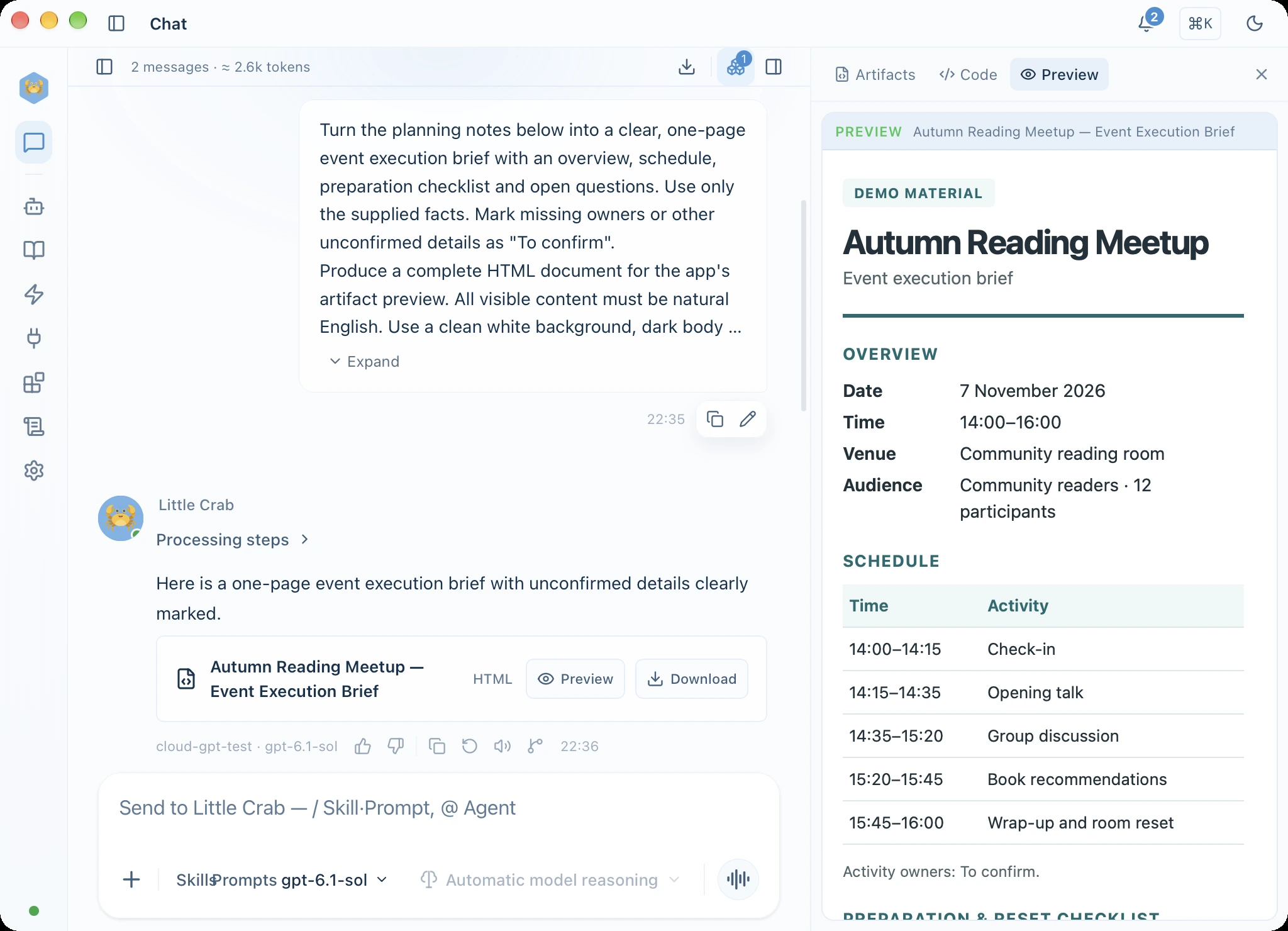
HexClaw installed desktop app in English: a conversation creates an event brief with an HTML preview

Use cases

Explore tasks for research, content creation and automation, and see what output to expect.
Research & Docs

Turn your sources into a cited report

Task Summarize imported project materials and cite primary sources.

Output Preview · Markdown
Q3 Architecture Review.md
Core services decoupled; inference latency dropped 38%[1]; desktop memory capped below 85MB[2].

Output Retrieved passages, citations and a generated document you can check against sources.

Explore knowledge and memory →
Agent Scenario · Socratic Tutor

Understand a problem before explaining it

Task Used storage is 4.8 TB, or 40% of capacity. What is the total capacity?

Step-by-step Guidance · Primary Math
Prompt: “If capacity is divided into 10 parts, what does 40% represent?”
Formula: 4.8 TB ÷ 40% = 12 TB

Output The original problem, step-by-step explanations and teaching notes. A parent should review content.

View the problem and notes (Chinese) →
Media & Design

Create a poster, then revise it

Task Create an event poster, then revise that image in the same conversation.

Artifact Canvas · Multi-modal
🎨Reading_Event_Poster_v2.png 2048×1480
Prompt tweakInpaint regionExport

Output An image preview and saved file. Connect a model that supports image generation and editing.

Read the media guide →
Automation

Run recurring tasks on a schedule

Task Prepare a weekly report and send it through a configured channel.

Scheduled Pipeline · Fridays 17:30
1. Aggregate Notes→2. Draft Digest→3. Dispatch Channel

Output Run history, output files and delivery at destination. Configure a channel first and keep service online.

Explore workflows and delivery →

Product capabilities

Combine agents, knowledge, tools and automation for a task. Follow progress and keep results you can reuse.
Product overview (Chinese PDF)
Core Privacy Foundation

100% Local-First, Your Data Stays Yours

Your connected local or self-hosted service stores data and configuration. Online models only receive payload required for tasks—no intermediary telemetry or data retention. Local vs Cloud Deployment
🔒 Local Sandbox 🛡️ Zero Data Scraping 🔑 Encrypted API Keys
Extensible Ecosystem

Any Model Provider, Standard MCP Plugins

Freely connect local Ollama, DeepSeek, Claude, OpenAI or compatible endpoints. Seamlessly bridge native tools and services via Model Context Protocol.
⚡ Ollama Local Inference 🌐 DeepSeek & OpenAI 🔌 MCP Compatible

Find Sources & Manage Memory

Search imported documents with precise citation. Inspect, correct, update or clear persistent long-term memories anytime.

Configure Specialized Agents

Create custom personas with specialized system prompts, tailored knowledge bases and toolkits for any workflow.

Generate Documents & Media

Create documents, posters, audio and video. Real-time preview, iterative inpainting and one-click export in Artifact panels.

Automate Tasks & Workflows

Trigger multi-step pipelines via cron schedules or webhooks. Full observability, retry resilience and execution history.

Get started in three steps

Install the app, connect a service and model, then try a task you know.
1

Install the app

On macOS, use the recommended one-line installer, or download a package for your system.
2

Connect a service and model

Choose a local or self-hosted service and confirm an available model. Connect any tools the task needs.
3

Try a specific task

Send a message or source material, then inspect progress and output files. Create an agent when you need a specialized role.

Download & install

The software is free and open source. Online models and external services may charge separately.

System requirements and installation

macOS one-line install (recommended)

Copy the command into Terminal and run it. Current bundled components require macOS 14 or later; Apple Silicon and Intel are supported.

curl -fsSL https://raw.githubusercontent.com/hexagon-codes/hexclaw-desktop/80060ab08b60b92b6cac4aa552a046b8e467c2b3/install.sh | bash

Installs the latest public release, which may be a prerelease.

Or install with Homebrew:

brew tap hexagon-codes/tap && brew install --cask hexclaw

v0.5.1 installers

macOS
.dmg
Windows
.exe
Linux
Linux
.deb / .AppImage / .rpm
All releases →

The open-source ecosystem

Explore the libraries, agent engine, backend and clients. Reuse or extend the layers you need.
POWERED BYHexagon AI Agent Engine
ReAct · Tool orchestration · Declarative workflows
Tauri v2Rust
Vue 3TS
Go Sidecar
Security Gateway
HexClaw walks sideways to work for you

Start using your private AI workstation

Free and open source with zero sign-up required. Download now to connect your own models and private knowledge bases.