The animal everyone in AI has been talking about lately is neither a cat nor a dog, but a “lobster.”
OpenClaw became popular for more than its ability to chat. For the first time, it turned many people's idea of an AI agent into an assistant that actually lives inside their workflow. It works through tools you already use, including Telegram, Slack, Discord, and Lark; unifies inboxes; replies to messages automatically; operates browsers and desktops; and runs tasks. It also emphasizes local execution, privacy, multiple models, and extensible skills.
For many people, the lobster moved the “AI assistant” beyond a chat box and into the role of a digital colleague that gets things done, stays online, and even has a personality. That is why it has inspired so many jokes and memes: “Have you adopted a lobster?”, lobster hats, claw gestures, and “a one-person company plus a lobster.”
What people are excited about is ultimately not a mascot, but the feeling behind it:
- AI no longer just answers questions.
- AI has started to take action.
- AI has finally begun working like an assistant.
HexClaw wants to address a different level of the problem.
The lobster feels like a useful, entertaining personal AI assistant you can start using immediately. HexClaw aims to be a local AI agent workbench for real workflows, with accumulated knowledge, agent orchestration, and traceable execution.
HexClaw goes beyond placing AI inside a chat interface. It uses Chat and IM channels as task entry points, builds its capabilities on Knowledge Base / Agents / Integrations , and adds Logs and troubleshooting workflows to complete the picture.
More precisely, the HexClaw website has consistently made one point: this is more than another wrapper around a chat box. It is an AI agent desktop client that works out of the box, powered by the team's own Hexagon AI Agent engine. The emphasis is on organizing capabilities, rather than merely collecting them: multi-agent collaboration, visual workflows, RAG knowledge bases, the MCP tool protocol, IM channels, real-time logs. All the capabilities are there, while data stays local wherever possible.
Putting the two side by side makes the distinction clearer:
- The lobster helps AI start working like an assistant.
- HexClaw helps AI run steadily as a workbench.
In more detail, HexClaw is concerned with these questions:
- Go beyond handling a single conversation and support ongoing work.
- Bring
Chat / IM Channels / Automationinto a shared execution chain, rather than serving just one entry point. - Organize
Knowledge Base / Agents / Integrations / MCP / Automationinto a complete workflow, beyond simply letting AI call tools. - Beyond “being able to do it,” make execution visible, searchable, diagnosable, and maintainable over time.
- Go beyond local execution to emphasize
sidecar architecture,local deployment,zero cloud dependencies,fully private data
The lobster is the star species that ignited the agent boom. HexClaw is a productivity species that can actually scuttle sideways into your desktop workflow.
If you remember one sentence about HexClaw, make it this:
HexClaw is a local AI agent workbench: Chat and IM channels bring in tasks, Knowledge Base / Agents / Integrations provide the capabilities, and logs support a complete troubleshooting process.
The website's homepage puts it plainly: Powered by the team's own Hexagon AI Agent engine, HexClaw is an AI agent desktop client that works out of the box. Local deployment, private data, and a fully open-source stack.
There is another point the website and README keep emphasizing: HexClaw is part of a full-stack, open-source AI agent ecosystem built by the hexagon-codes team, rather than an isolated application.
This ecosystem does more than open-source a desktop shell. Its layers are decoupled from the infrastructure upward:
toolkit: infrastructure providing shared capabilities such as logging, configuration, HTTP, and concurrencyai-core: the AI foundation for LLM providers, embeddings, function calling, memory, and vectorshexagon: the team's agent engine for ReAct, Plan-and-Execute, workflows, and tool schedulinghexclaw: the backend sidecar for RESTful APIs, RAG retrieval, Cron scheduling, conversation persistence, and engine integrationhexclaw-desktop: the desktop client for native local execution, sidecar integration, and cross-platform deliveryhexclaw-ui: the web client for the main product interface and UI reuse with the desktop clienthexagon-ui: the agent observability console for execution tracing, reasoning replay, and performance observation
This distinguishes HexClaw from products that open-source only their entry-point application. It has an entire open-source toolchain behind it, released under the Apache-2.0 license. What you see is more than a downloadable client: it is an AI agent engineering system you can audit, understand, reuse, and continue evolving.
From a product perspective, this means:
- You can use it directly as a desktop client that works out of the box.
- You can also treat it as a local-first AI agent platform with private data.
- You can go deeper into its engine, backend, tool protocol, and observability system.
Start with the diagram below to understand how to use it and how the modules work together:
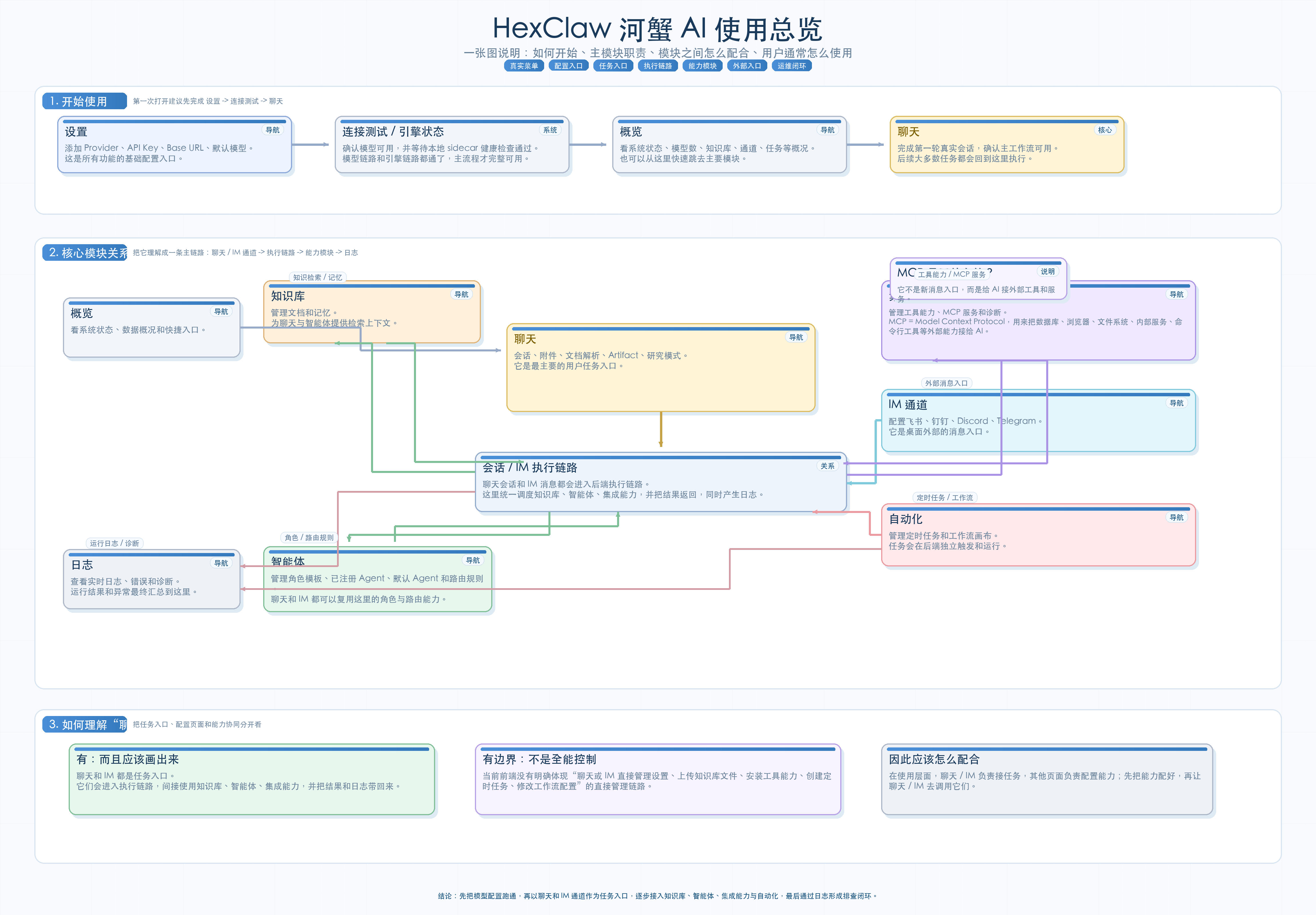
If you are new to HexClaw, the suggested order is:
- First, think of it as a local AI workbench.
- Then see
ChatandIM channelsas task entry points. - Then see
Knowledge Base / Agents / Integrationsas the capability foundation. - Then see
Automationas the ability to run proactively. - Finally, see
Logsas the complete troubleshooting process.
The Open-Source Ecosystem
One major characteristic of HexClaw is that it open-sources the whole chain, from underlying infrastructure to the desktop client, rather than just a desktop shell.

The website's About page defines it as a full-stack, open-source AI agent ecosystem built by the hexagon-codes team.
The README and website repository describe this ecosystem chain consistently:
toolkit -> ai-core -> hexagon -> hexclaw -> hexclaw-desktop / hexclaw-ui / hexagon-uiEach layer in the chain has a clear responsibility:
toolkit: infrastructure providing logging, configuration, HTTP, concurrency, error chains, and other shared capabilitiesai-core: the AI foundation for provider adaptation, embeddings, memory, and vectorshexagon: the team's agent engine for ReAct, Plan-and-Execute, workflows, and tool schedulinghexclaw: the backend sidecar for RESTful APIs, RAG retrieval, Cron scheduling, conversation persistence, and engine integrationhexclaw-desktop: the desktop client for native local execution, sidecar integration, and cross-platform deliveryhexclaw-ui: the web client for the main product interface and UI reuse with the desktop clienthexagon-ui: the agent observability console for execution tracing, reasoning replay, and performance observation
This distinguishes HexClaw from products that open-source only their entry-point application. It has an entire open-source toolchain behind it, released under the Apache-2.0 license. What you see is more than a downloadable client: it is an AI agent engineering system you can audit, understand, reuse, and continue evolving.
Seen this way, HexClaw is both a product and an engineering ecosystem growing in the open:
- For everyday users, it is a desktop client that works out of the box.
- For technical users, it is a local-first AI agent platform with private data.
- For developers, it is an open-source capability stack to explore and integrate with at deeper levels.
Further reading:
- Website: hexclaw.net
- Online documentation (Chinese): hexclaw.net/zh/docs/
- Product overview (Chinese): hexclaw.net/zh/docs/overview
- GitHub: github.com/hexagon-codes/hexclaw-desktop
If you have already tried raising a lobster, why not try raising a crab too?