Model Providers
Configure model providers, credentials and availability for your selected HexClaw service.
Providers and Compatible Endpoints
| Provider | Example models | Credentials |
|---|---|---|
| OpenAI | GPT / o series | API Key |
| DeepSeek | DeepSeek family | API Key |
| Anthropic | Claude family | API Key |
| Google Gemini | Gemini family | API Key |
| Alibaba Qwen | Qwen family | API Key |
| ByteDance Ark | Doubao and models available through Ark | API Key |
| Zhipu AI | GLM family | API Key |
| Kimi (Moonshot) | Kimi family | API Key |
| Baidu Qianfan | ERNIE family | API Key |
| Tencent Hunyuan | Hunyuan family | API Key |
| iFlytek Spark | Spark family | API Key |
| MiniMax | MiniMax family | API Key |
| Ollama | Installed local models | No key for the default local setup |
| Custom | Models exposed by a compatible endpoint | Follow the selected endpoint requirements |
Model names are examples. Select a provider type, then check its current API documentation for the full base URL, API key, and model ID. Native and compatible protocols may use different endpoints; a website domain alone is not a complete API URL. Available models depend on your account, region, and the list returned by the current service.
Ark: the API key is the authentication credential. An ep-... value is an endpoint ID and belongs in the model field; supported model IDs can also be used. The standard base URL is https://ark.cn-beijing.volces.com/api/v3. See the official Ark guide.
Add a Provider
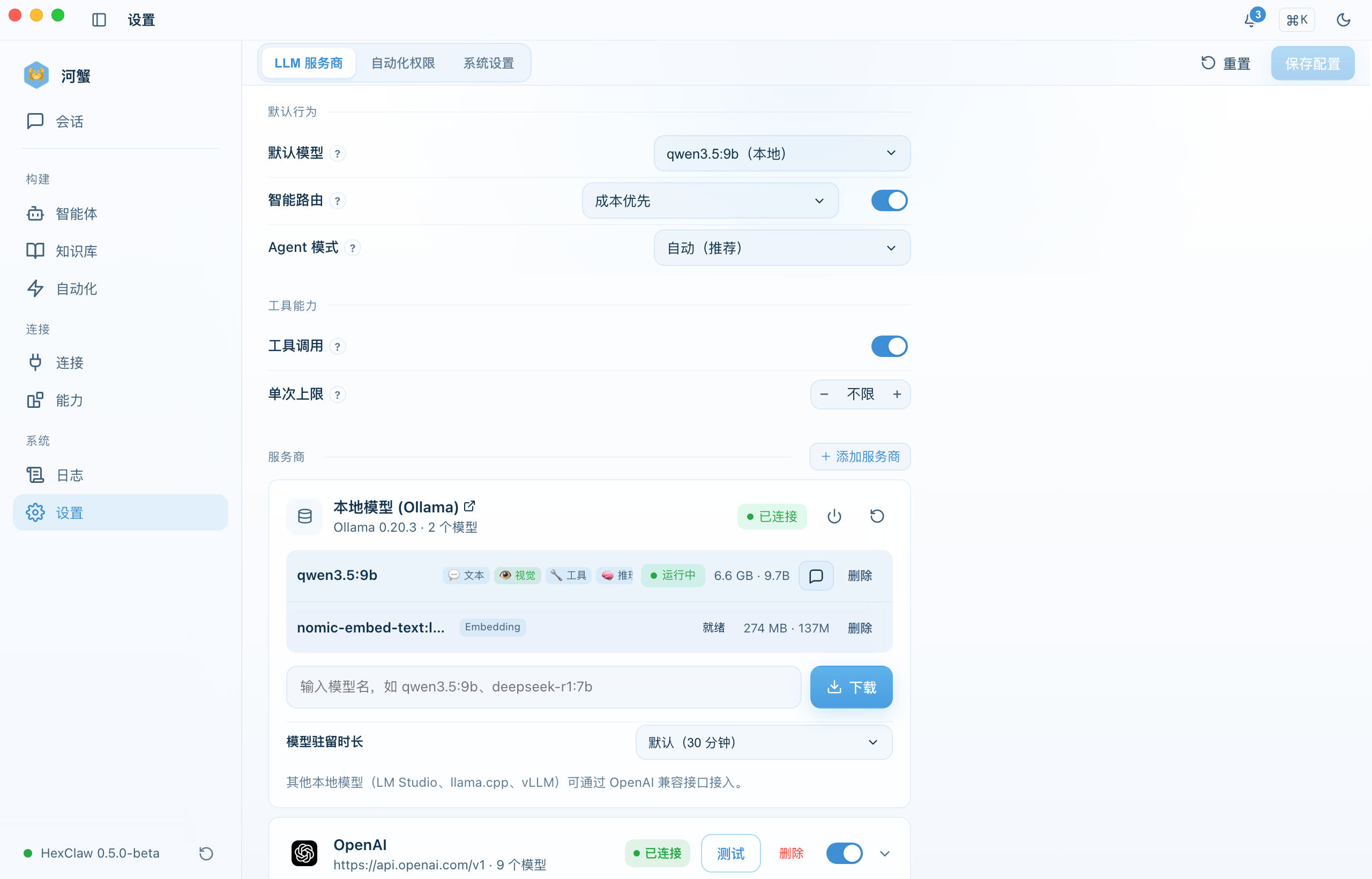
- Go to Settings → Model services
- Click "Add Provider"
- Select a provider type such as OpenAI or DeepSeek
- Enter the provider API key; configuration belongs to the currently connected service, as explained below
- Optionally override the base URL for a proxy or private deployment
- Save the provider
Model Capabilities
Capabilities belong to individual models. A provider name does not imply that all its models support the same inputs and outputs:
| Capability | Use |
|---|---|
text / code | Text chat and code generation; the default chat model requires text capability |
vision | Understand input images, separate from image generation or editing |
video | Understand input video, separate from video generation |
audio | Supported audio input and responses; transcription and read-aloud require their respective services |
image_generation | Generate images; editing also requires a model and endpoint that support it |
video_generation | Generate video and retrieve the resulting artifact through task progress |
embedding | Produce vectors for knowledge retrieval, rather than regular chat |
Check the configured purpose before selecting a chat or dedicated media model. An unclassified capability list does not mean every operation is supported. Catalog entries, capability declarations, and successful individual calls are separate evidence. Reasoning controls also depend on the exact model.
Local Ollama Setup
After downloading a model, Ollama can run inference locally. Whether the whole task stays offline also depends on web tools, cloud models, and external services it uses.
# Install Ollama
brew install ollama    # macOS
# Or download it from ollama.com

# Start Ollama and pull models
ollama serve
ollama pull llama3.1
ollama pull qwen2.5
ollama pull deepseek-r1
In HexClaw, add Ollama as a provider with base URL http://localhost:11434/v1. No API key is required.
API Key Security
For the local desktop service, the Sidecar saves Provider API keys in ~/.hexclaw/hexclaw.yaml, with directory permissions 0700 and file permissions 0600. Provider keys are not additionally stored in the system keychain or browser storage. A self-hosted cloud connection uses that service's Provider configuration and credentials; local configuration does not automatically sync to the cloud.
Test Connection
Use the provider card's test action to check an actual call with the selected endpoint, credentials, and model. Tests may consume provider quota. Inspect the returned result and error details; a successful test does not validate every model, media operation, or tool capability offered by that provider.
Automatic Model Selection
Automatic selection follows the current service's default model, task capabilities, and routing settings. Dedicated media tasks use the appropriate capability routes. For recoverable model failures, the service can try an eligible fallback provider.
Fallback depends on the failure type, available models, and task state; not every failure is resent. Check the actual model in the execution record. If an external operation has an unknown result, inspect the original task before generating or sending again.